Two different excel files (Cobra and Eel). Pig names?
They have metrics for eye function across time.
Aaron told me to take the ‘first tab’ in each excel file. Which is not the case, as at least to me, ‘Sheet 1’ is empty in both. So I’m using the next tab in both, which is ‘Normalized 2 Base For Comb’
# A tibble: 6 × 8
  Pig_Name  Week Region       Cells Output           GroupCount  Data    STD
  <chr>    <dbl> <chr>        <lgl> <chr>                 <dbl> <dbl>  <dbl>
1 Eel 668      0 Healthy_Sham FALSE Area-Under-Curve          3   1   0.0537
2 Eel 668      0 Healthy_Sham FALSE HFC-Scalar                3   1   0.514
3 Eel 668      0 Healthy_Sham FALSE LFC-Scalar                3   1   0.135
4 Eel 668      0 Healthy_Sham FALSE N1                        3   1   0.0631
5 Eel 668      0 Healthy_Sham FALSE N1-Latency                3  20.7 0.577
6 Eel 668      0 Healthy_Sham FALSE N1-Prom                   3   1   0.0781
Looks like we have implant (cobra) vs sham (eel)?
We have several types of Output (Area-Under-Curve, HFC-Scalar, LFC-Scalar, N1, N1-Latency, N1-Prom, N1-Width, N1P1, N2, N2-Latency, N2-Prom, N2-Width, N2P2, P1, P1-Latency, P1-Prom, P1-Width, P1N2, P2, P2-Latency, P2-Prom, P2-Width, Pos.-Area-Under-Curve, RMS-HFC) which are different variables that have been measured. I asked Aaron what he cared most about and he suggested AUC, N1P1, and Latency
AUC, N1P1, Latency
We need to get the exact names for those variables
We can extract all of the Output values and only print the unique ones
OK, so Area-Under-Curve, N1P1, and N1-Latency are the three variables we’ll take a look at. Or fewer if I get confused.
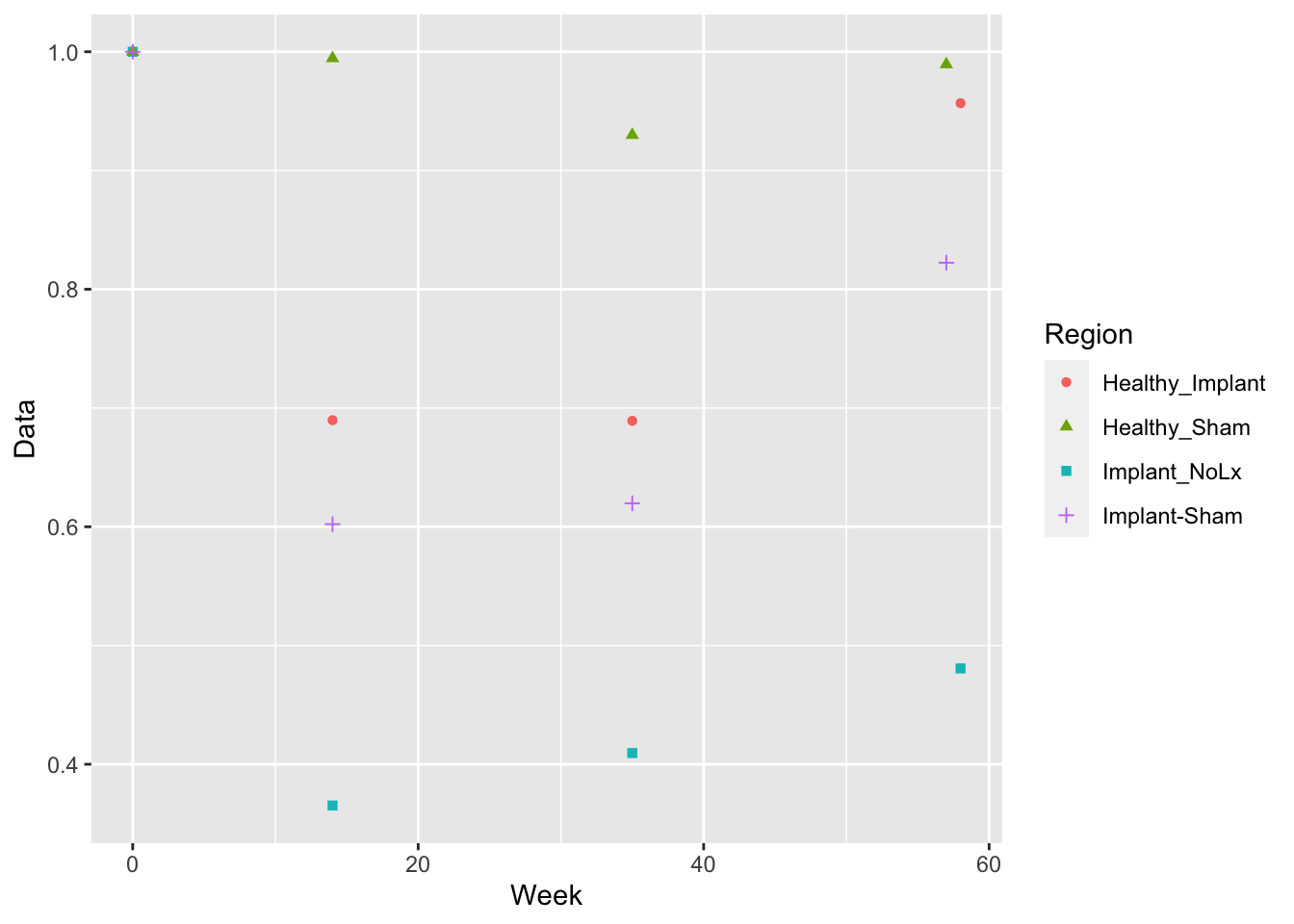
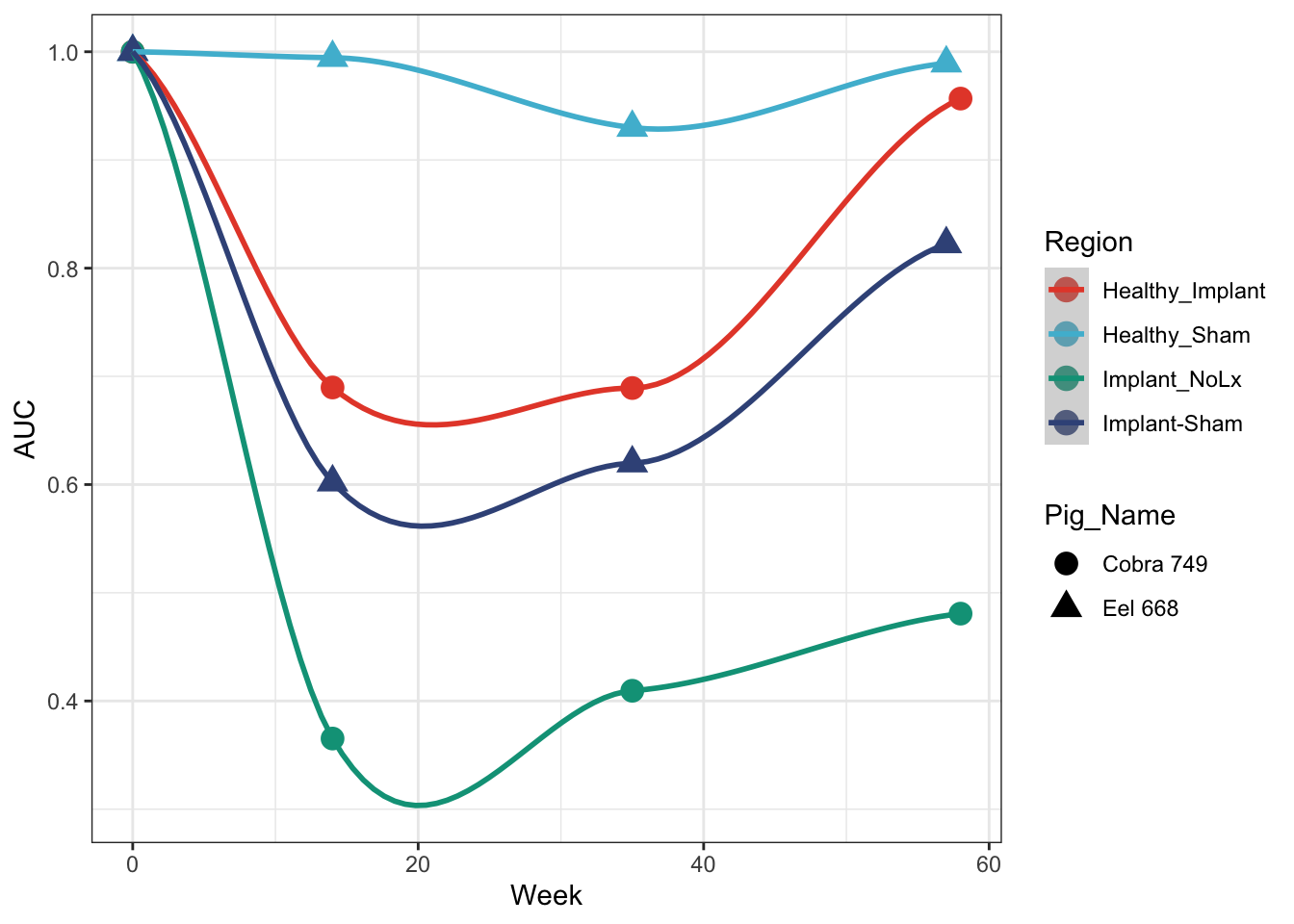
Let’s start by just looking at AUC. Generically it is a machine learning measure of how often an algorithm will distinguish the right answer over the wrong one. 1 is perfect. 0 is perfect wrong. 0.5 is a monkey flipping coins. Not sure what it means here.
Summary of eel and cobra AUC
Get the summary data from just the AUC values for each pig
Using the ggsci library with the Nature Publishing Group color scheme (scale_colour_npg())
cobra_eel_AUC %>%ggplot(aes(x=Week, y=Data, colour=Region, shape = Pig_Name)) +geom_point(size=4) +geom_smooth(method ='loess') +## this draws the smoothed lines through the four points. It auto picks an algorithm that works. loess was used heretheme_bw() +scale_colour_npg() +ylab('AUC')
`geom_smooth()` using formula = 'y ~ x'
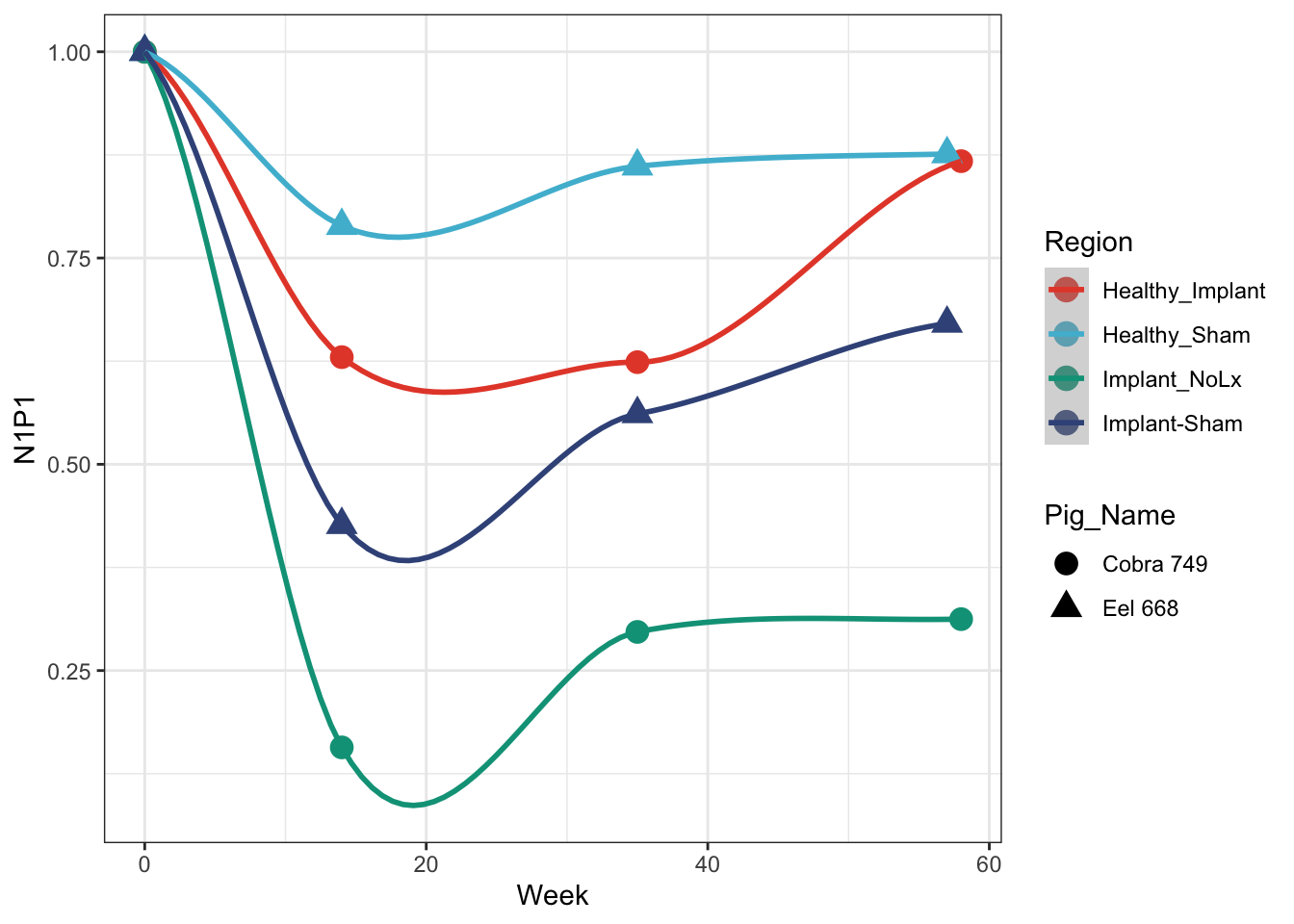
N1P1 Plot
rbind(cobra %>%filter(Output =='N1P1'), eel %>%filter(Output =='N1P1')) %>%ggplot(aes(x=Week, y=Data, colour=Region, shape = Pig_Name)) +geom_point(size=4) +geom_smooth() +## this draws the smoothed lines through the four points. It auto picks an algorithm that works. loess was used heretheme_bw() +scale_colour_npg() +ylab('N1P1')
`geom_smooth()` using method = 'loess' and formula = 'y ~ x'
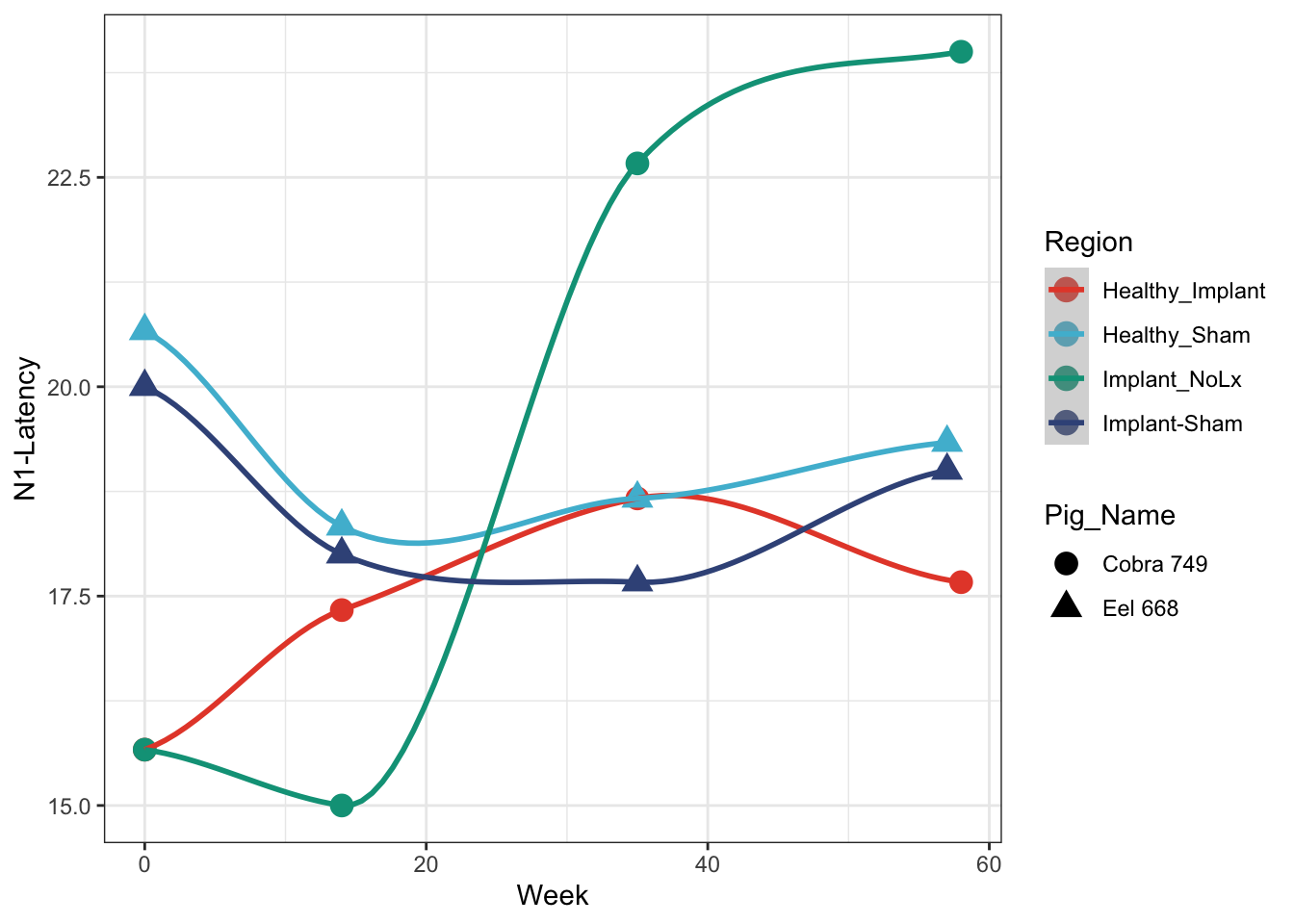
Latency plot
rbind(cobra %>%filter(Output =='N1-Latency'), eel %>%filter(Output =='N1-Latency')) %>%ggplot(aes(x=Week, y=Data, colour=Region, shape = Pig_Name)) +geom_point(size=4) +geom_smooth() +## this draws the smoothed lines through the four points. It auto picks an algorithm that works. loess was used heretheme_bw() +scale_colour_npg() +ylab('N1-Latency')
`geom_smooth()` using method = 'loess' and formula = 'y ~ x'
Bonus
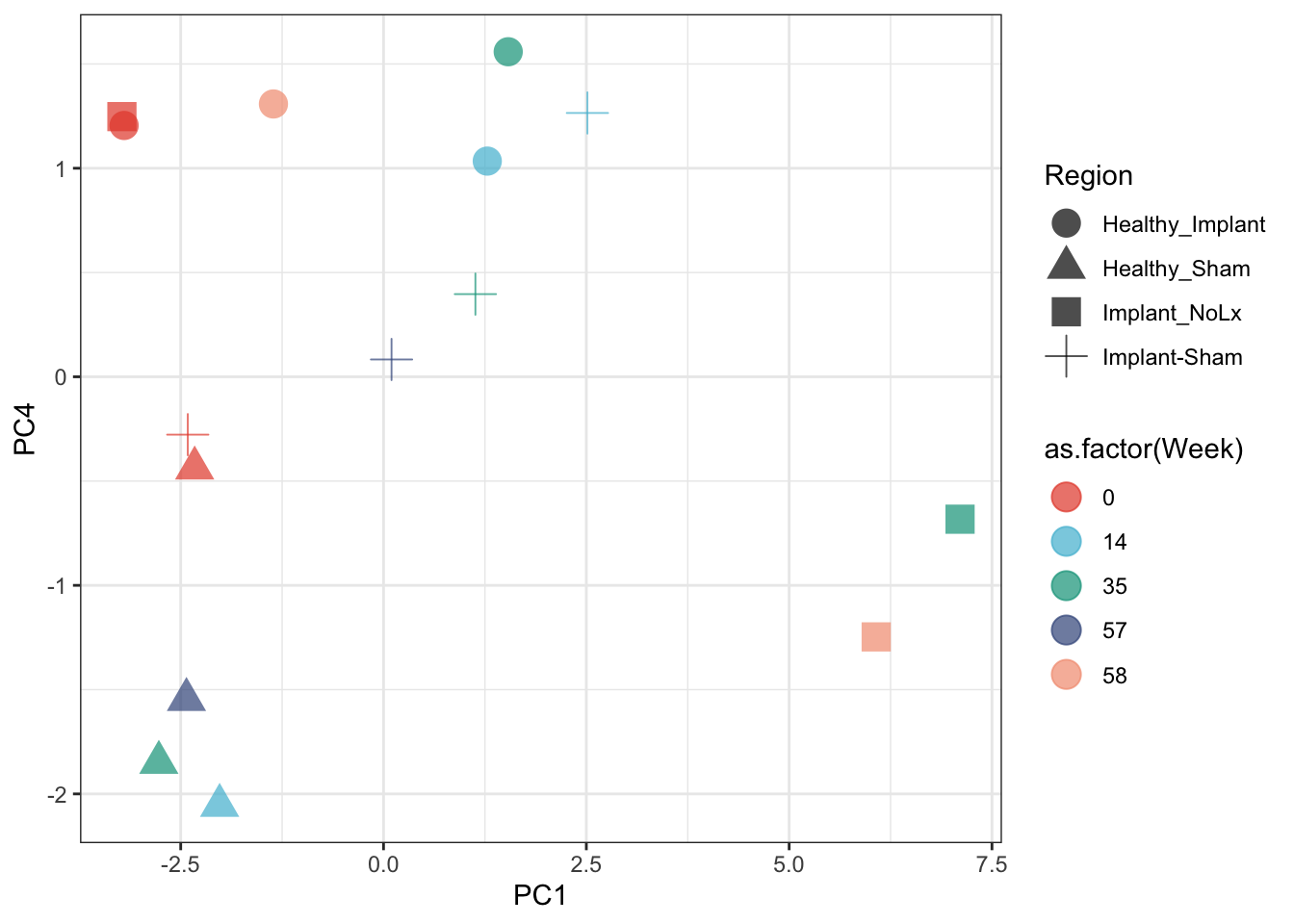
We have many variables. We can get a quick sense of how all of the variables separate out the major data categories with a PCA
all_pigs <-rbind(cobra, eel) %>%select(Region, Pig_Name, Week, Output, Data) %>%spread(Output, Data)## toss P-Prime-Latency columnall_pigs <- all_pigs %>%select(-`P-Prime-Latency`)## remove columns with NAall_pigs <- all_pigs[complete.cases(all_pigs), complete.cases(t(all_pigs))]pca <-prcomp(all_pigs[,4:ncol(all_pigs)], scale. = T)## pull out PCA coordinates (pca$x) and add to all_pigs with the cbindall_pigs <-cbind(all_pigs, pca$x)ggplot(all_pigs, aes(x=PC1, y=PC4, color=as.factor(Week), shape=Region)) +geom_point(size=5, alpha=0.7) +theme_bw() +scale_colour_npg()